Best Time to Save at Piktochart
We analyzed 12 months of promo code history to show when Piktochart typically offers the most promo codes and the biggest discounts. Use these trends to find the best time to shop.
-
🏷️
Highest discount:
55% (August)
-
🎟️
Most promo codes:
40 (July)
-
📅
Last updated:
Today
Piktochart code verifications
Live dashboard of recent Piktochart code checks and shopper reports.
Piktochart was founded in Malaysia in 2011 with a focused idea: make infographics and data-heavy information easier to turn into clear visuals without needing a design background. The platform has since expanded beyond infographics into presentations, reports, posters, charts, videos, and AI-assisted visual creation, while keeping information design at the center of its offering.
That focus has shaped its audience. Teachers use Piktochart to turn lessons and research into classroom-ready visuals; marketers and communications teams use it for reports, presentations, and branded materials; and individuals can build polished graphics on their own. Templates, drag-and-drop editing, data visualization, and AI tools together are what set Piktochart apart from a basic template library. Anyone weighing a paid plan may also want to check for a Piktochart promo code or coupon first.
How to save on Piktochart
Piktochart offers several ways to cut your subscription cost, but the right route depends on what you're actually building. Before you reach for a promo code, coupon, or discount, figure out whether the free tier, annual billing, specialist pricing, or a higher-level plan actually fits the work.
- Start with the free workspace: Build the kind of presentation, infographic, report, or classroom visual you expect to make, rather than subscribing off the feature list alone. Free Forever includes unlimited visual projects, 60 AI credits, 2 PNG downloads, 1 GB of storage, and room for up to four members. If those caps don't get in the way of the finished result, there's little reason to upgrade just because a coupon happens to be floating around. Save the promo code for when you genuinely need paid functionality.
- Put the AI tools through their paces: Piktochart's free AI allowance covers tasks like building presentations and posters, generating images, removing backgrounds or objects, and sharpening image quality. Test those functions on work you'd otherwise do by hand–that's what tells you whether a bigger paid allowance is worth anything. Free access gives you 60 AI credits, versus 500 on Pro and 1,000 on Business, so a discount only starts to matter once AI use is already a regular part of how you work, not an occasional experiment.
- Use a free template before reaching for premium assets: The library has free designs for presentations, infographics, flyers, resumes, education materials, and more. A student putting together one presentation, or a teacher prepping a single handout, can probably just adapt an existing layout. Someone turning out client reports every week is in a different position, especially once premium templates, icons, illustrations, and other assets start cutting down on repetitive design work. In the first case, a promo code barely moves the needle; in the second, a coupon can make the premium tier easy to justify.
- Treat annual billing as a deliberate call, not a default: Pro runs $15 a month billed monthly, or $10 per member monthly when billed annually. That gap matters most if Piktochart is going to stay in your workflow across several campaigns, reporting cycles, or client assignments. A discount stacked onto an annual subscription can sharpen that rate further–but only once you've confirmed twelve months of access actually makes sense. Committing to a year purely because a promo code makes the sticker price look good is how you end up paying for time you never use.
- Move to Business for recurring brand work: Business costs $20 a month on monthly billing, or $17 per member monthly annually. What you get on top: the full Brand Kit, branded templates, PDF and PowerPoint export, 1,000 AI credits, and 250 GB of storage. A team churning out sales decks, reports, and campaign graphics under one visual identity can cut a lot of repeated formatting and asset-hunting this way. A coupon or discount earns its keep here because it lowers the cost of something the team was already going to use–not because it turns a nice-to-have into a purchase.
- Confirm eligibility before grabbing a generic offer: Students, teachers, professors, and education staff qualify for the Education tier at $39.99 per user per year; registered nonprofits get the nonprofit rate at $60 per member annually. Both come with Pro-level extras–unlimited downloads, Brand Kit access, 250 AI credits. If you qualify, check that rate first, before typing a promo code off some coupon site; a dedicated discount often beats a general promotion, even one advertising a bigger percentage off.
- Treat Enterprise as a custom decision, not a bulk discount: Organizations with 101+ members can request Enterprise pricing rather than just stacking seats onto a standard tier. It's built around things like SSO/SAML, security review, custom templates, onboarding, and a dedicated account manager. At that scale, the discount that actually matters usually isn't a percentage off list price–getting the configuration right counts for more. A promo code or coupon meant for ordinary subscriptions shouldn't be what decides an enterprise rollout.
Kodobi fits in at the final price-check stage, once you already know which Piktochart tier and billing term you want. It's a convenient place to check current offers and see whether a discount improves the choice you've made–not something that should decide the choice for you.
How to apply a Piktochart promo code
A Piktochart promo code or coupon gets applied when you set up a paid subscription–you won't find a code field anywhere inside the editor itself. Kodobi can help you track down a valid offer before you even reach checkout.
- Open Piktochart, sign in, and go to Upgrade from your account.
- Choose Pro or Business, then pick monthly or annual billing.
- Move through the subscription setup until you land on the checkout page.
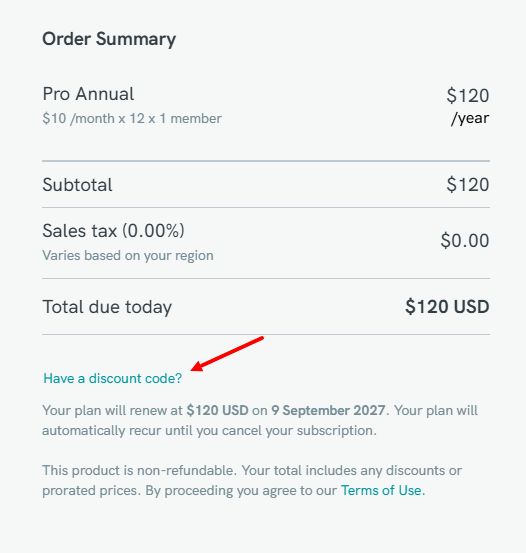
- Click Add Discount and enter the promo code from Kodobi.
- Confirm to apply the code to your subscription.
- Double-check the total before paying–the discount should already be reflected in the price.
Current Piktochart offers
Piktochart currently runs five main plans, from a $0 tier to discounted pricing for education and nonprofit users.
- Pro: Billed annually, this runs $10/month ($120/year) and includes unlimited downloads, premium templates, 5M+ icons and illustrations, 500 AI credits, and 100 GB of storage. A coupon, if available, can shave a bit more off the annual total–worth checking before you assume none apply.
- Business: $17/month billed annually ($204/year), with the full Brand Kit, branded templates, PDF/PPT export, 1,000 AI credits, and 250 GB of storage. Worth confirming a promo code–or coupon–applies here rather than to a different tier before entering it.
- Education: Students, teachers, professors, and education staff pay $39.99 per user per year for Pro-level access, verified via a qualifying .edu/.org email or supporting documentation. At that price, it often beats hunting down a discount elsewhere.
- Nonprofit: Registered nonprofits pay $60 per member per year for Pro-level features, including unlimited downloads, Brand Kit access, and 250 AI credits. Compare this against any coupon or promo code on offer–the nonprofit rate alone may already be the better deal.
- Free Forever: No cost, with unlimited visual projects, 60 AI credits, two PNG downloads, free templates, 1 GB of storage, and a four-member workspace, plus a seven-day Pro trial for new accounts. No coupon or discount needed to try it out.
Kodobi tracks current Piktochart coupon and promo code listings, so you can see what's actually on offer before subscribing–and judge any discount against the real plan price, not the other way around.
Strengths and features
- Built for information-heavy visuals: Piktochart's core strength is turning dense data into infographics, reports, and charts that stay readable, not just decorative.
- Low design barrier: Templates and drag-and-drop editing mean someone with zero design training can still produce a layout that looks intentional.
- One platform, multiple formats: Infographics, presentations, reports, posters, charts, and videos all live in the same workspace, so teams aren't switching tools mid-project.
- Built-in team branding: Business workspaces include a Brand Kit and branded templates, so recurring materials–reports, decks, updates–stay visually consistent without manual policing.
- AI embedded in the workflow: AI-generated presentations and posters, image upscaling, background removal, and object removal cut down on repetitive production tasks, rather than sitting off to the side as a novelty feature.
Range of products and services
- Infographics and data visualization: Piktochart's core strength is turning research, statistics, and dense datasets into charts and infographics that read clearly at a glance.
- Presentations and documents: Build reports, decks, posters, and flyers for everyday business, education, and internal communication needs.
- AI-assisted creation: Generate presentations and posters automatically, then clean up assets fast with image upscaling, background removal, and object removal.
- Team and brand tools: Keep teams aligned with shared workspaces, centralized brand assets, and templates locked to brand guidelines.
Piktochart suits situations where information needs to land quickly and look professional, even when there's no dedicated designer involved. Its range of formats also carries it past one-off graphics: the same workspace can shift between a report, a presentation, a classroom visual, or a data-heavy update as needs change. For teams and individuals turning out this kind of material regularly, that flexibility cuts production time without adding a heavier design process.