Best Time to Save at CCleaner
We analyzed 12 months of promo code history to show when CCleaner typically offers the most promo codes and the biggest discounts. Use these trends to find the best time to shop.
-
🏷️
Highest discount:
60 $ (October)
-
🎟️
Most promo codes:
31 (June)
-
📅
Last updated:
Today
CCleaner code verifications
Live dashboard of recent CCleaner code checks and shopper reports.
CCleaner started in 2004 as a small utility built to fix one specific annoyance: the digital buildup that quietly bogs down everyday Windows use. Piriform, the London-based company behind it, built a reputation on a lightweight approach to system upkeep–clearing temp files, managing stored data, and keeping machines running smoothly without any technical know-how required. Once Avast acquired the company, CCleaner broadened its lineup while sticking to its original purpose: practical, no-fuss upkeep for everyday PCs.
Today, people turn to CCleaner for the small, recurring headaches of owning a computer–reclaiming storage, speeding things up, keeping browsing habits private. Beyond its core cleaner, the lineup includes Recuva for pulling back deleted items, Speccy for a full readout of internal hardware, and privacy utilities built to put users back in control of what they share online. Anyone weighing the paid version can check current offers with a CCleaner promo code, so they end up paying for the functions they'll actually use instead of a bundle padded with extras.
How to save on purchases at CCleaner
CCleaner's pricing only makes sense once you know which problem you're actually solving. Someone nursing an aging laptop back to health, digging up a deleted document, or shaking off online trackers isn't necessarily shopping for the same package. Knowing what separates the free utilities from the paid extras and the bundled options keeps you from paying for capability you'll never touch–and it puts you in position to use the right promo code, coupon, or discount when one actually applies.
- Start with what's already free: CCleaner, Recuva, Speccy, and Defraggler all offer no-cost versions that handle most everyday upkeep without asking for a subscription. You can clear out clutter, bring back accidentally deleted documents, inspect your hardware, and tidy up drive organization before deciding whether the paid tier is worth it. It's a sensible first move if you're not sure an upgrade would even be noticeable–and it leaves the door open to use a promo code later, once the Pro-level extras start to matter.
- Move to Professional once doing it by hand gets old: CCleaner Professional exists for people who'd rather not manually manage cleanup and privacy every time. Automatic cleaning, browser privacy controls, scheduled upkeep, and performance tracking suit anyone who returns to the same computer daily for work, hobbies, or everything in between. Hunting down a CCleaner coupon before you commit can smooth the switch, especially if you've already put the free version through its paces and know exactly what you're missing.
- Test Kamo before paying for privacy protection: Privacy software is hard to evaluate from a product description, since it only proves its worth against your own browsing habits. Kamo's 14-day trial lets you try things like fingerprint masking and tracker blocking without handing over card details first. Once you've seen whether those protections are worth keeping, looking for a coupon can bring down the cost of the ongoing annual charge.
- Match CCleaner Cloud to how many machines you're actually running: Looking after a handful of computers calls for something different than caring for one personal laptop. CCleaner Cloud gives you a 14-day trial before locking you into payment, priced at $2 per PC monthly or $20 per PC yearly–a 17% saving over paying month to month. For a household or small office, a discount like that can make managing everything from one dashboard more appealing than handling each machine on its own.
- Time your promo code to a decision you've already made: A promo code earns its keep when it backs up a choice you were going to make anyway, not when it talks you into a subscription you didn't need. Someone tired of manual cleanup wants something different from someone who just needs to recover one lost document occasionally. Checking current CCleaner offers before checkout can turn up a coupon or discount that lines up with what you already picked, rather than pushing you toward whatever's cheapest.
- Watch for short-term price cuts on the paid tiers: Most people decide to upgrade only after trying the free tools first, so timing ends up shaping the final decision. Seasonal sales, limited pricing windows, and renewal-time offers can all shave money off the Professional tier, especially useful if you want long-term access or coverage across several machines. A live coupon stacked on top of an already-lowered price adds a bit more value still.
- Go with a bundle when your needs span several tools: Not everyone needs just a cleaner or just a recovery utility–some people need the whole toolkit. This bundle brings together CCleaner, Recuva, and Speccy's Pro versions–covering system cleanup, deleted-file recovery, and hardware monitoring–all in one purchase. A discount coupon applied to a bundle like this often does more good than chasing separate price cuts on each piece individually, since it covers multiple needs at once.
- Check your plan before it renews on autopilot: Your computer habits shift over time, and whatever subscription made sense last year might not fit anymore. Before a renewal goes through, take a moment to check whether you still need the deep cleaning, privacy controls, or cloud management. It's also the right moment to look for a fresh promo code, or coupon, instead of just accepting whatever price the renewal notice throws at you.
Kodobi tracks CCleaner deals–promo code listings, coupons, and discount opportunities–so you can compare what's out there against the services you're weighing. Rather than digging through scattered promotions yourself, you can find CCleaner savings in one spot and pick based on what you'll genuinely use.
How to apply a CCleaner promo code
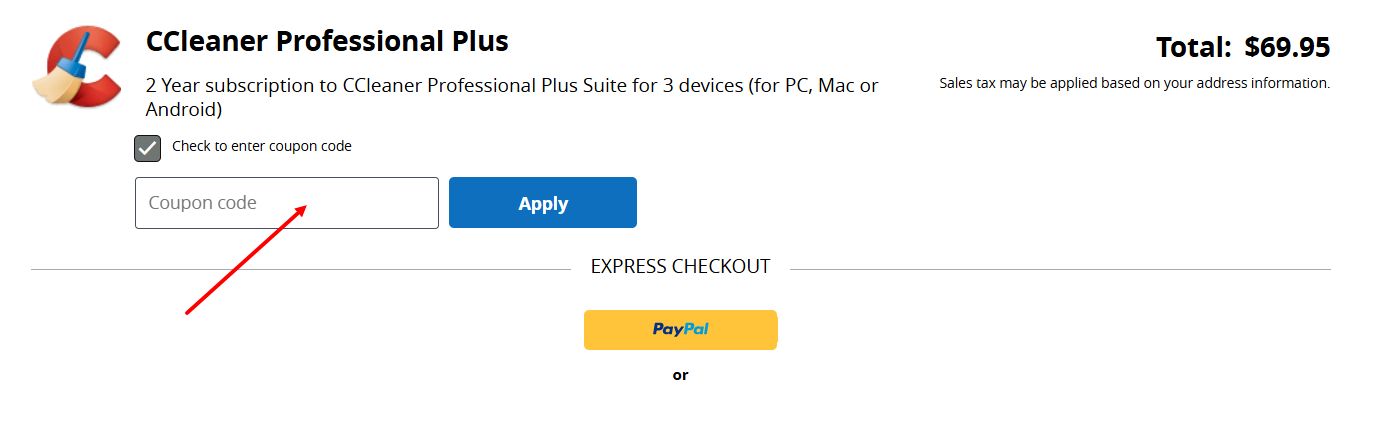
Kodobi collects current CCleaner deals in one spot, so you can grab a working promo code before settling on a plan. Discount codes at CCleaner get applied right in the checkout process itself–you'll enter the coupon while picking your plan or software, not at a separate cart stage like on most retail sites.
- Pick the CCleaner product you're after–Professional, the Kamo plan, or whichever option is on offer.
- Choose how long you want it for and how many devices it should cover, then head to checkout.
- Look for the promo code box on the payment screen and paste in the discount code from Kodobi.
- Enter the coupon, then confirm that the discount has been applied and the updated price appears before moving forward.
- Finish paying to unlock the CCleaner features on your account.
Current offers
CCleaner's current lineup spans subscription tiers and multi-app bundles, covering everyone from someone who just wants one cleanup utility to households managing several machines.
- Professional Plus, up to 40% off: Cuts the price of CCleaner's fuller maintenance suite, unlocking extra cleaning, optimization, and privacy tools.
- One-year, single PC: $20 off a year of CCleaner Professional built for one machine–a fit for anyone who only wants the paid features on their main computer.
- Three devices, one year: A $30 discount applies to the annual Professional Plus plan covering up to three devices, useful for families or anyone juggling more than one screen.
- Three devices, two years: The two-year plan for up to three devices comes with $70 off, aimed at people who'd rather not renew every twelve months.
- File recovery: Recuva's one-year premium plan carries a 20% discount, adding recovery power for anyone needing back deleted files, photos, or documents.
- Four apps, one price: CCleaner for PC, Android, and Mac bundles with Recuva and Speccy for $29.95 covering three devices–a 66% saving versus buying each program on its own.
Kodobi gathers CCleaner promo code links, coupon listings, and discount offers in one place, so users can compare deals without hunting across scattered pages.
Benefits and advantages
CCleaner has grown from a familiar PC cleanup utility into a wider system for keeping machines running smoothly, tightening privacy, and staying easy to manage. Its edge comes from bundling several kinds of upkeep under one roof.
- Beyond basic cleanup: CCleaner handles everyday optimization, while sister apps like Recuva for file recovery and Speccy for hardware analysis take on problems a standard cleaner isn't built for.
- Performance with privacy in mind: alongside clearing out junk files, CCleaner lets users control stored browsing data and online tracking through features like browser cleaning and Kamo's privacy safeguards.
- Built to grow with what you need: the free version covers essential maintenance, while Professional plans layer in automation, scheduled tasks, and deeper controls for anyone who wants less manual upkeep.
- Coverage across your whole setup: with options for PC, Mac, Android, and cloud-based management, CCleaner suits people juggling several machines, not just one computer.
CCleaner software range
CCleaner covers the essentials of keeping a computer running well–clearing out clutter, recovering what's been lost, checking what's under the hood, and keeping browsing habits private.
- Cleanup and speed: The core CCleaner app clears junk files and browser residue and handles everyday tuning, while Defraggler lets you dig deeper into how your drive is organized.
- Recovery and hardware insight: Recuva pulls back files you thought were gone for good, and Speccy lays out your machine's components so you know exactly what you're working with.
- Staying under the radar: Kamo masks your digital fingerprint to cut down on tracking, and CCleaner's built-in privacy tools wipe away the traces browsing leaves behind.
- Managing from afar: CCleaner Cloud lets you keep an eye on and maintain several machines from a single dashboard.
CCleaner has stayed relevant because its lineup tracks how people genuinely use their computers: storage clears out gradually, files get lost and need recovering, hardware gets checked before an upgrade, and privacy settings need tending as tracking grows more pervasive online. Between the free utilities and the paid extensions, users can pick exactly how much upkeep suits their habits–no need to sign up for more than they'll use.