Best Time to Save at SwifDoo
We analyzed 12 months of promo code history to show when SwifDoo typically offers the most promo codes and the biggest discounts. Use these trends to find the best time to shop.
-
🏷️
Highest discount:
55% (August)
-
🎟️
Most promo codes:
18 (November)
-
📅
Last updated:
Today
SwifDoo code verifications
Live dashboard of recent SwifDoo code checks and shopper reports.
SwifDoo was founded in 2017 to address a persistent gap in digital document tools: software that tends to be either overbuilt for everyday needs or too bare-bones for real professional work. The company's answer was SwifDoo PDF, a desktop application that brings editing, conversion, annotation, e-signing, compression, and file organization together under one roof.
Where many document platforms lean into enterprise-grade complexity, SwifDoo aims for something more approachable: real editing power without a long setup curve. That balance appeals to office staff handling contracts and reports, students pulling together research files, and small teams that need document tools flexible enough to fit different workflows. Over time, the company has layered in cloud storage, AI-assisted features, and multi-user plans, while still offering a free tier so people can try the software before committing to a paid version. Shoppers looking to cut the cost of premium features can often track down a SwifDoo promo code on coupon sites that list current offers.
How to save on SwifDoo purchases
SwifDoo's tiered pricing suits different kinds of document users, so cutting costs usually comes down to timing the purchase and matching the plan to actual needs. A student compiling research notes, a freelancer handling client paperwork, or a small team managing shared files will each get value from a different mix of options, promotions, and savings routes.
- Start with the free version. SwifDoo publishes a downloadable build handling core editing tasks, letting people gauge the software before paying for anything. Someone who mainly reads, annotates, or reorganizes files may find that version covers everything they need, while those handling contracts, reports, or larger projects can pinpoint which premium tools actually earn their keep.
- Run the trial against real work, not a guess. Editing a contract, batch-converting PDFs, inserting signatures, or juggling several files at once shows plainly whether the paid tier justifies its price–and helps avoid paying for tools that rarely get touched.
- Pick a license length that mirrors your usage. SwifDoo sells monthly, quarterly, annual, two-year, and lifetime terms. Someone handling paperwork year-round may come out ahead with a longer commitment, while occasional users might prefer something shorter. A SwifDoo promo code applied before checkout can lower the cost of whichever plan is chosen without changing what's unlocked, and a discounted renewal rate later can stretch the savings further still.
- Check whether education or nonprofit pricing applies. SwifDoo runs an application-based discount track for schools, community groups, and nonprofits, built for organizations running classrooms, labs, or internal operations on tight budgets. For groups that qualify, this route often beats waiting on a general sale or tracking down a SwifDoo promo code that may not even apply to their plan–though it's still worth checking it against any seasonal discount SwifDoo is running publicly.
- Choose the team license for multi-user needs. SwifDoo's team plan covers up to 10 users and bundles Windows tools, free ongoing updates, watermark-free output, bulk-pricing rates, 10GB of cloud storage, and a month of SwifDoo AI. Companies with shared document pipelines often find this cheaper and simpler than buying seats individually, especially once bulk pricing takes effect. A coupon aimed at team purchases can lower the cost of a multi-seat order, and a second coupon applied at renewal can hold down expenses in year two.
- Watch the timing of sales before committing. When you buy can move the final price nearly as much as what you buy, especially for anyone weighing subscription lengths against each other. A short-lived markdown can turn a yearly or lifetime license into a far better deal than paying full price later. Checking current offers and a SwifDoo promo code beforehand gives buyers a real shot at cutting costs while still landing on the right plan–and it's worth confirming the same discount applies across all tiers, not just the entry-level one.
- Bring in a coupon only after the decision is made. A coupon works best confirming a choice already reached, not shaping it. Once someone knows whether they need a single seat, a team license, or a specific toolset, a SwifDoo coupon can cut the total without pushing them toward something bigger than they need. Sites like Kodobi collect available coupon codes, cutting down the search for one that actually works.
- Factor in what's bundled with the price. Paid SwifDoo versions include free upgrades and support, which affects the software's value over time. For anyone working with digital paperwork daily, ongoing improvements and available help can prevent future headaches and reduce time spent comparing tools later. A markdown on a reliable option can matter more, in the end, than a rock-bottom price on something limited.
- Look at SwifDoo's other resources. The Free Ebooks Hub offers no-cost titles across more than twenty genres, compatible with Kindle, Nook, iPad, and Android. Anyone working with PDFs for research, reading, or coursework can draw on these alongside the core software. Kodobi also tracks related savings, including SwifDoo coupons and active promo codes tied to ongoing campaigns.
Kodobi rounds up current SwifDoo deals, gathering discounts, coupon options, and promo codes in one place. Rather than chasing stale promotions across scattered sites, visitors can browse live options and pick whichever fits their document needs. With listings updated regularly, Kodobi makes finding a worthwhile deal before upgrading far less of a chore.
How to apply a SwifDoo promo code
Kodobi helps users track down current SwifDoo deals before settling on a PDF edition, so the discount hunt starts by lining up an offer with the license someone already wants, rather than reshaping that choice around a discount code. Once a SwifDoo subscription or license is selected on the official website, the promo code gets entered at checkout, before payment goes through.
- Pick the SwifDoo plan you want and click "Buy Now."
- You'll land automatically on the checkout page of the official website.
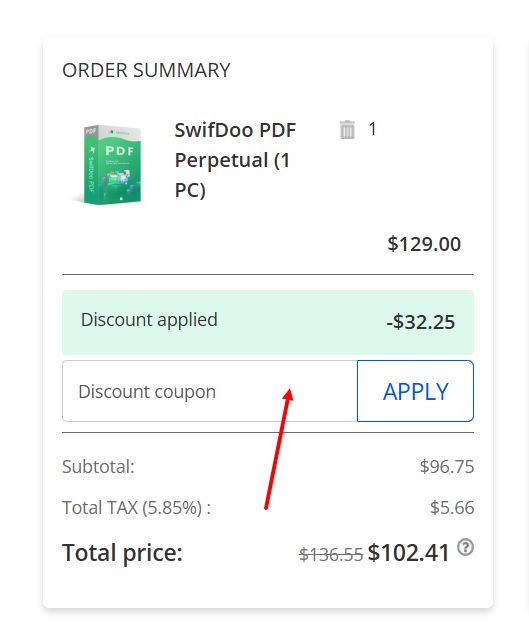
- Look over the license details–duration, features included–then click "I have a discount coupon," found in the "Order Summary" panel on the left.
- Type the SwifDoo promo code supplied by Kodobi into the "Discount coupon" box and apply it.
- Confirm the new total reflects the reduction before finalizing payment.
- Submit the order once the price and license terms check out.
Current offers
SwifDoo's current campaigns span several types of buyers, from those chasing a milestone-anniversary deal to those hunting cheaper access through student pricing or flexible license terms. Kodobi keeps tabs on these live offers so visitors can locate a working SwifDoo promo code instead of digging through expired listings.
- Nine years in, extra prizes on the table: To mark its ninth year, SwifDoo has cut prices by as much as 84% and added an iPhone 17 giveaway to the mix. A SwifDoo promo code listed on Kodobi points users to the specifics of this discount campaign.
- Lower rates for classroom use: Teachers and students qualify for a 50% discount on SwifDoo PDF, putting document-editing tools within reach for coursework, lesson prep, and research projects.
- Savings built into every license tier: SwifDoo's paid plans carry price cuts of up to 32% across single-device and multi-device versions, spanning monthly, quarterly, yearly, two-year, and lifetime terms for up to two machines. Anyone comparing tiers can check Kodobi for a promo code matching the deal they want.
Kodobi organizes SwifDoo's price cuts and discount coupon entries as offers shift, so tracking down a live deal before upgrading takes less digging.
What makes SwifDoo stand out
SwifDoo entered the PDF software space aiming to bridge the gap between bare-bones free viewers and bulkier enterprise suites, packaging serious editing power into a lighter desktop footprint.
- One application, the full workflow: SwifDoo brings editing, conversion, annotation, compression, merging, and signing together, so common paperwork tasks stay in a single window instead of bouncing between programs.
- Built with different users in mind: students, professionals, individual users, and small teams can pick a licensing tier that matches how often they touch PDFs and whether the whole group needs to work from the same file.
- A no-cost tier alongside paid tiers: the free version handles the essentials, while upgrading unlocks a deeper toolkit, ongoing updates, and direct support.
- AI and cloud built in: alongside standard tools, SwifDoo layers in its own AI assistant and cloud storage sync for anyone juggling a heavy stack of files.
- Licensing that stays simple: monthly, annual, two-year, lifetime, and team-based options put the choice in users' hands, with team tiers scaling up to 10 seats for shared work.
Product range
SwifDoo builds tools around document handling, spanning desktop editing, AI-assisted analysis, and a separate library of reading material.
- SwifDoo PDF: The flagship application, it consolidates editing, conversion, annotation, compression, merging, and electronic signatures into a single interface.
- SwifDoo AI: Layered directly into the document workflow, these capabilities let users query and interpret file contents without switching tools.
- Team and business tiers: Built for shared document environments, these offer multi-user licensing along with cloud storage and centralized administration for smaller organizations.
- Free Ebooks Hub: A separate offering from the software lineup, this is a no-cost ebook library spanning more than twenty genres, readable on Kindle, Nook, iPad, and Android devices.
SwifDoo suits people who deal with digital files often enough that a basic viewer falls short, but who don't want to wrestle with an overengineered toolkit. Between its editing features, flexible licensing, AI-assisted extras, and support for solo or team use, it covers a broad stretch of routine paperwork–reports, forms, research documents, shared files. For anyone juggling that kind of workload, SwifDoo keeps the editing, signing, and file-management side of things in one place instead of scattered across separate tools.