Best Time to Save at Movavi
We analyzed 12 months of promo code history to show when Movavi typically offers the most promo codes and the biggest discounts. Use these trends to find the best time to shop.
-
🏷️
Highest discount:
15% (August)
-
🎟️
Most promo codes:
10 (April)
-
📅
Last updated:
Today
Movavi code verifications
Live dashboard of recent Movavi code checks and shopper reports.
Movavi was founded in 2004 with a single piece of multimedia software. It gradually expanded into a wider range of tools for video editing, screen recording, photo editing, media conversion, and slideshows, with products for Windows, Mac, mobile devices, and the web. Today, its software is sold in more than 190 countries.
The company primarily targets people creating videos, photos, presentations, and recordings for personal projects, study, work, and social media, rather than professional production houses. The expansion was relatively fast: by 2014, Movavi offered 21 applications in 18 languages. For anyone weighing a standalone program against a broader package, a Movavi promo code or discount may help determine which option offers the better fit.
How to save on purchases at Movavi
Movavi's pricing works best when you match the plan to how you'll actually use the software, not to whichever percentage looks biggest. A person finishing a single clip has little reason to buy a broad toolkit, while someone juggling footage, images, screen captures, and visual effects may land on a different plan after comparing options. That's where a Movavi promo code, coupon, or discount can genuinely tip the decision rather than just shave a few dollars off a purchase you'd already made anyway.
- Test the software on the files you actually use: Free trials exist for Video Suite, Video Editor, Photo Editor, Video Converter, Screen Recorder, and Slideshow Maker. Know the limits going in: exports carry a watermark, clips are capped at 60 seconds, and certain export functions are locked. Still, it's a solid way to check whether the interface fits your workflow before redeeming a promo code or paying for a full license.
- Use the Effects trial for an actual project, not a feature tour: The seven-day trial unlocks a library of more than 6,000 effects and music tracks. It's worth it if you're finishing a series and need a wider range of transitions, titles, overlays, or tracks in a short window. The catch is auto-renewal at $49.95 a month, so weigh any coupon for this trial against the date it expires, not in isolation.
- Look at bundles through the tools you'd otherwise buy separately: Video Suite pairs the editor, converter, and screen recorder, while other combinations mix editing and photo tools. Someone who only trims clips won't gain much from the larger package; someone who regularly records tutorials and converts footage might. In that second case, a discount tied to a bundle can shift the math enough to make the wider license the smarter buy.
- Check the academic route before grabbing a general deal: Students and teachers can apply for a discount on Personal Educational Licenses through Movavi's education program using a school email. Institutions get a separate track with organization-wide licensing, admin controls, MSI deployment, and free demos. A general coupon might catch your eye on the storefront, but an education-specific discount can be worth more if you actually qualify.
- Stop pricing seats one by one once you need several: Movavi's volume licensing for businesses starts offering per-seat discounts from five licenses upward. A team equipping several editors can also get a dedicated account manager, priority support, and flexible payment terms like purchase orders or wire transfers; bigger rollouts get quoted directly by sales. At that scale, the promo code that matters isn't necessarily the one with the biggest headline number–the licensing structure itself often carries more weight.
- Time a newsletter coupon to a purchase you've already planned: Movavi's mailing list sends subscribers exclusive coupons alongside editing tips. That's far more useful when you already know which tool you want and can simply wait for the right moment than when you're just hoarding promotional emails. It gives the coupon an actual function in the process: you pick the software first, then check the savings against that choice.
- Read the recurring billing terms before treating a trial as free: The trial is fully unlocked for seven days, but staying past that triggers a $49.95 monthly charge unless you cancel. If you only needed the library for one wedding reel, school assignment, or short campaign, there's little reason to keep paying afterward. The same reasoning applies to any subscription tied to a discount: factor in the eventual renewal cost from day one.
- Treat the refund policy as part of your compatibility test: Movavi offers a 14-day money-back guarantee when a technical issue can't be fixed. This matters most if you're working with a specific camera format, an older machine, an unusual display setup, or an established workflow. Rather than trusting a spec sheet, use that window to see how the tool actually behaves under your real conditions, then decide if the original discount still holds up.
- Match the plan to how long the job will actually take: A monthly subscription suits a short production cycle better, while a longer license fits someone editing steadily all year. A one-off project rarely justifies keeping several apps active after delivery, whereas a creator publishing content regularly can get real value from staying subscribed to the editor or the effects library. A promo code can narrow the price gap, but it shouldn't be what decides the length of your commitment.
- Check for a deal before moving from trial to checkout: Once you've settled on a specific tool, bundle, or subscription, look for an active promo code or coupon before paying instead of assuming the first price shown is final. A discount matters most at this stage, since the real decision is already made–you're just confirming it applies to the exact license, term, and billing setup you're about to commit to.
Kodobi pulls current Movavi deals into that final comparison, surfacing a promo code, coupon, or discount whenever one applies to the license you're weighing. The goal isn't to stockpile every offer available, but to see whether a specific coupon actually changes which option–standalone tool, bundle, or subscription–comes out ahead.
How to apply a Movavi promo code
After choosing your Movavi software, you’ll find the coupon field at checkout, not on the product page. Enter your Kodobi promo code there before completing your purchase.
- Choose your program or bundle on Movavi and click “Buy Now.”
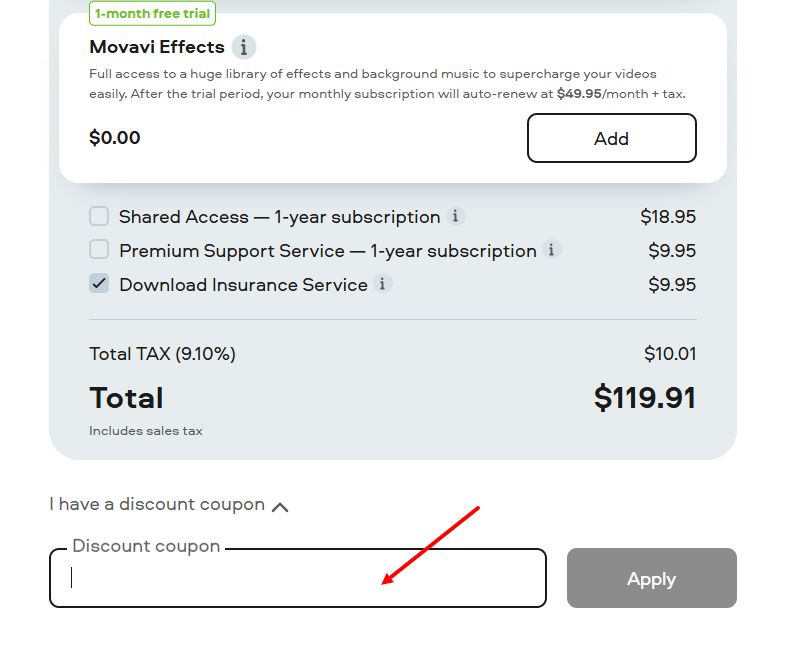
- At checkout, look below your order total on the left and select “I have a discount coupon.”
- Enter your Kodobi promo code in the “Discount coupon” field, then click “Apply.”
- Make sure the total has updated, then add any optional extras you need.
- Enter the required billing and payment details, then complete your order.
Current offers
Movavi's current promotions split into four groups: Unlimited plans, bundles, Effects Store pairings, and standalone licenses.
- Movavi Unlimited: the 1-year plan is 80% off through September 13, 2026, covering eight programs plus a year of Effects Store access–6,000+ effects and 1,500 music tracks included; a promo code may unlock an additional offer for qualifying customers.
- Business: Movavi Unlimited Business drops from $2,819.65 to $274.95 per year under the same terms, and companies can separately check whether a live promo code applies to their chosen license.
- Bundles: Video Suite Plus costs $99.95 for one year instead of $250.95, combining the flagship editing software, a converter, screen capture tool, full Effects Store access, and three bonus packs. Other pairings: the Suite with Photo Editor at $104.95, the core editor with Photo Editor at $79.95, screen capture bundled with it at $59.95, and the converter alongside it at $64.95.
- Effects and standalone plans: Video Suite with Movavi Effects runs $59.95 monthly; the flagship program or Slideshow Maker, each paired with Effects, costs $54.95. Photo Editor with Slideshow Maker is $74.95 a year, the Suite alone is $29.95 monthly, and single programs start at $19.95.
Kodobi rounds all of this up into one running list of active coupons, discounts, and promo codes–a quick way to check current Movavi deals before checkout.
Strengths and features
Movavi's edge isn't depth in any one discipline–it's how much ground the suite covers without tipping into professional-production territory.
- One toolkit, many jobs. Video editing, photo editing, screen recording, format conversion, slideshows, and VHS capture replace what would normally be a stack of separate apps.
- A built-in content library. The Effects Store stocks over 6,000 transitions, overlays, titles, and music tracks–enough raw material that most projects don't need outside assets.
- Utility beyond cutting clips. Screen recording and conversion handle tutorials, presentations, and file prep just as often as they handle creative work.
- Low-risk entry. Free trials cover the core programs, and the 14-day money-back guarantee protects against technical dead ends–a straightforward way to check fit before buying in.
Product range
Movavi's toolkit spans every step of working with photos and video:
- Video: Editor and Suite cover editing tasks, while Screen Recorder grabs on-screen activity.
- Photos: Photo Editor handles retouching and color correction.
- Conversion: Video Converter reformats media for different devices and platforms.
- Slideshows and legacy formats: Slideshow Maker pulls together photos and clips, VHS Capture digitizes old analog tapes, and Media Player with ChiliBurner cover playback and disc burning.
Movavi is most useful when editing, recording, or handling different types of media becomes a regular part of your work or study rather than an occasional task. Its software covers several common needs across formats, so there is less reason to piece together a separate tool for each one. Trials also let you test a specific program on your own projects before deciding whether it is worth paying for.