Best Time to Save at Newegg Business
We analyzed 12 months of promo code history to show when Newegg Business typically offers the most promo codes and the biggest discounts. Use these trends to find the best time to shop.
-
🏷️
Highest discount:
30 $ (October)
-
🎟️
Most promo codes:
34 (March)
-
📅
Last updated:
Today
Newegg Business code verifications
Live dashboard of recent Newegg Business code checks and shopper reports.
Newegg Business is the business-focused arm of Newegg, Inc., launched in 2009 to handle technology purchasing for organizations rather than individual PC enthusiasts. The company operates from Diamond Bar, California, and serves a notably broad mix of buyers: small businesses ordering equipment for a growing office, IT departments replacing aging hardware, schools and government organizations working within purchasing requirements, and system integrators sourcing components at scale. Its catalog covers the familiar PC and office categories, but also extends into servers, networking, storage, infrastructure hardware, and other equipment that tends to be bought according to specifications rather than impulse.
A business account is built around recurring procurement rather than one-off orders, with tools for quotes, purchasing controls, account management, and business-oriented payment arrangements layered on top of the catalog. Newegg's own history reinforces this: the company grew out of Fred Chang's PC-building business in the 1990s, leaving Newegg Business with a long-standing footing in the component and hardware trade. Even so, for a buyer replacing a server or outfitting an entire office, a Newegg Business promo code or coupon plays a smaller role than the technical requirements, order quantities, and budget approvals that actually drive the purchase.
How to save on purchases at Newegg Business
Newegg Business is built around purchases that often have a specification, a quantity, and a deadline attached to them. That makes the right offer harder to spot than a flat "take X% off": a company replacing 30 monitors may care about quantity pricing, an IT team buying a server may need the right configuration first, and a business with recurring tech spend can get substantially more mileage from its membership benefits.
- Make BizPoints part of the annual buying picture: Newegg Business Rewards is structured for companies that keep coming back for the same categories of gear. Base members earn 1 BizPoint per $2 spent, Silver members earn 1.5 points per $2 after $5,000 in spending, and Gold members earn 2 points per $2 after $20,000. The tiers aren't only about future discounts: Silver adds free shipping on orders of $500+, rush processing, and exclusive offers, while Gold includes free return shipping, advanced replacements, no restocking fees on eligible orders, and 50% off Saturday deliveries. For an IT department buying monitors one quarter and storage or networking gear the next, those accumulated benefits can matter more than a one-time coupon.
- Log in before pricing a larger rollout: Buying one monitor tells you little about what 25 will cost. Newegg Business makes quantity-based pricing available to registered members, which is particularly relevant when a company is standardizing workstations, deploying identical displays, or stocking replacement drives. Checking the logged-in price before finalizing the specification can prevent a procurement team from evaluating a bulk requirement against the ordinary single-unit price.
- Use the E-Blast as a reason to wait on non-urgent buys: The weekly Newegg Business E-Blast rotates discounted prices, coupons, and promo codes, giving buyers with a flexible deadline another variable to consider. The current campaign, EMC-081926, is for registered U.S. accounts, permits one discount code per item, and lists validity through 08/19/26; the campaign changes as new mailings go out. The subscription is available in the homepage footer through "Become a NeweggBusiness Insider," which is especially useful for companies that make recurring buys rather than monitoring individual sale pages.
- Put a promo code against the right specification, not merely the lowest ticket: With business tech, the cheapest configuration can become expensive once it needs upgrading. A workstation intended for AI workloads, for example, may need substantial memory and storage from the outset; a promo code that reduces the price of that appropriate build has a clearer value than a discount attached to a machine that will immediately need extra components.
- Use Net Terms when the invoice date and deployment date don't line up: Eligible companies can apply for Net-30, Net-60, or Net-90 terms through Newegg Business. That gap becomes relevant when equipment has to be installed for a project before the related revenue arrives, or before an organization's normal accounts-payable cycle closes. In that situation, the financing arrangement can influence the buying decision just as much as a coupon or advertised discount.
- Choose financing according to the scale of the buy: Credit and leasing options give businesses alternatives to paying the full amount at checkout. Leasing can be worth examining for expensive workstations or infrastructure that forms part of a planned refresh, while conventional credit may suit a smaller acquisition the business expects to expense on its normal schedule. The relevant question isn't simply which option exists, but which one fits how the item will be used and paid for.
- Check cooperative purchasing terms before treating the order like a retail transaction: Organizations eligible for NCPA or TIPS GPO pricing may have access to arrangements that don't appear beside a standard public discount. For a school, government agency, or other participating institution, confirming the applicable agreement can be more consequential than finding another coupon, because the negotiated framework is tied to the organization's procurement status.
- Use Server Builder when the machine has to fit a particular workload: One server is rarely interchangeable with another simply because both sit in the same product category. Newegg Business's Server Builder gives a buyer a way to configure the system around requirements such as processing capacity, memory, storage, and infrastructure needs. That's a better starting point for a virtualization host or business application server than choosing a superficially cheaper build and discovering later that the specification has to be rebuilt.
Kodobi adds another layer to that process by bringing current Newegg Business offers into one place instead of leaving buyers to piece them together from sale pages, emails, and checkout messages. A useful promo code can be spotted alongside a relevant coupon or discount, while expired promo codes, coupons, and discounts get filtered out as offers change. For someone timing a tech refresh, that means a promo code is easier to weigh against the actual order, a coupon can be checked before committing to a configuration, and a discount can be told apart from an offer that no longer applies.
How to apply a Newegg Business promo code
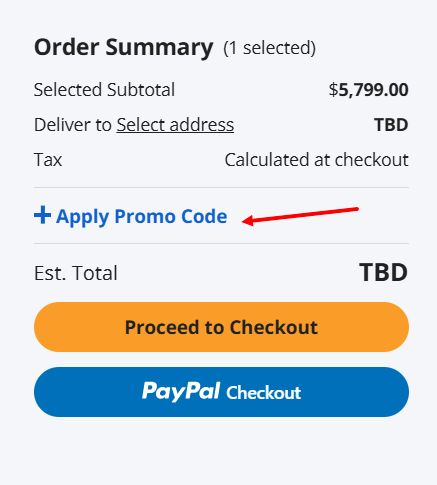
Kodobi can point you to a current Newegg Business coupon or promo code before you start checkout, which is particularly useful when the offer is tied to a business account, a specific category, or a particular promotion. On Newegg Business, the coupon is entered from the cart during checkout rather than somewhere on the product page.
- Open the Newegg Business offer from Kodobi and select the qualifying item on the site.
- Add the chosen configuration to the cart, then go to the cart page.
- Click "Apply Promo Code" in the Order Summary, then enter the code in the field that appears.
- Confirm that the code applies to the specific product; Newegg Business promotions can have item, account, quantity, or campaign restrictions.
- Once the discount appears in the checkout total, proceed to checkout.
- Sign in to the Newegg Business account associated with the promotion. Some offers are restricted to registered U.S. accounts.
- Check the order summary for the adjusted price before moving on to payment.
- Confirm the payment and delivery details to complete the transaction.
Current deals
Newegg Business currently has several sale sections, but they serve different buying needs: everyday office hardware, open-box stock, infrastructure gear, and high-end computing.
- Weekly Deals: About 94 listings are currently marked down by up to 72%; one example falls from $89.99 to $24.99, while free shipping applies to most of the featured selection.
- Clearance: Newegg Outlet has open-box and clearance stock at up to 71% off, including a Zebra keyboard priced at $167.47 instead of $574, along with rack units, monitors, and tablets.
- Savings Spotlight: More than 26 discounted listings cover laptops, motherboards, monitors, drives, and memory, spanning several categories at once.
- Server Deals: This section focuses on rack systems, chassis, UPS units, and related components; a Tripp Lite network card, for example, is listed at $359.99 versus $399.99, with free shipping on qualifying listings.
- Workstations: The current "Enterprise Power for Every Vision" campaign features AI workstations with up to $3,000 off, including an ABS 192GB system reduced from $48,999 to $45,999.
- Free Shipping: Many listings in these sale sections carry free shipping, with the applicable terms displayed on each Newegg Business product page.
Kodobi also tracks Newegg Business promo code, coupon, and discount information alongside current offers, listing whether a given coupon still applies on top of an already marked-down price. That distinction matters most when a promo code carries its own conditions, or when a discount has simply replaced an earlier promotion instead of stacking with it.
What stands out about Newegg Business
Newegg Business pairs a full-scale tech catalog with the account infrastructure that recurring or large IT purchases actually require.
- Volume pricing and quotes. Account tools support coordinated buying across teams, offices, or multiple locations, with quoted pricing available on qualifying orders.
- Beyond desktops and laptops: the catalog covers servers, networking gear, storage, UPS units, and components alongside standard workstations.
- Net-30, Net-60, or Net-90 terms are available to qualifying businesses, along with credit lines and leasing for bigger purchases.
- NCPA and TIPS cooperative agreements open up procurement for eligible schools, agencies, and other government or institutional buyers.
- Rewards tiers scale with spend: higher levels unlock rush processing, advanced replacements, free return shipping, and waived restocking fees.
Product range
Newegg Business covers everyday office technology as well as the hardware behind larger IT deployments:
- Laptops, desktops, mini PCs, and business computing systems
- Processors, graphics cards, motherboards, memory, power supplies, and PC cases
- Monitors, keyboards, mice, webcams, headsets, and other peripherals
- SSDs, hard drives, external storage, and backup solutions
- Servers, server components, racks, and chassis
- Switches, routers, adapters, and wireless networking hardware
- UPS systems, power-management equipment, cables, and connectivity accessories
- Workstations and high-performance computing rigs
What sets Newegg Business apart is how a routine hardware refresh and a specialized infrastructure project can run through the same account without friction: a company might order monitors and laptops for incoming staff in one transaction, then configure servers or expand storage capacity in the next. Handling both under one purchasing system means IT teams aren't forced to split everyday restocking from larger buildouts–specs, quantities, and approvals stay in a single workflow instead of scattered across separate vendors.