Best Time to Save at Homestyler
We analyzed 12 months of promo code history to show when Homestyler typically offers the most promo codes and the biggest discounts. Use these trends to find the best time to shop.
-
🏷️
Highest discount:
50% (August)
-
🎟️
Most promo codes:
48 (March)
-
📅
Last updated:
Today
Homestyler code verifications
Live dashboard of recent Homestyler code checks and shopper reports.
Homestyler launched in 2009 with a straightforward goal: put interior design visualization within reach of people who lack professional software or formal design training. It grew out of technology tied to Autodesk and evolved into a browser-based tool where users lay out rooms, test different styles, and turn rough ideas into realistic 3D renders before committing to a renovation or purchase.
Today, Homestyler serves both homeowners rearranging a living room and interior designers building out concepts and client presentations. What sets it apart is the mix: a straightforward interface, a large catalog of real furniture models, AI-assisted tools, and a community space where people share their designs. Rather than just offering inspiration, Homestyler lets users see how a decision will actually look in their own room. For those exploring the paid tier, Homestyler promo codes and coupon offers can lower the cost of unlocking the advanced features.
How to save on purchases at Homestyler
Homestyler's pricing works best when matched to how you actually use it. A student building a portfolio, a homeowner testing renovation ideas, and a firm producing client visuals each have different reasons to upgrade–so the smarter approach is choosing access that fits the work at hand, not the highest tier available.
- Try it free before you commit: Homestyler's free tier lets new users explore room layouts, 3D visualization, and the general workflow before paying for anything. It's the clearest way to find out whether AI-assisted features and higher-resolution renders would actually change your output.
- Check education pricing: Students and teachers get 35% off, and graduates get 20% off after finishing their studies. Useful for coursework, portfolio pieces, and early freelance jobs where the visuals need to look professional on a limited budget.
- Look into group access: Universities, nonprofits, and educational organizations can get 50% off, and teams over 10 people may qualify for bulk pricing. Good fit for classrooms, workshops, or studios where multiple people need the same environment without juggling separate accounts.
- Upgrade once you know what you need: A Homestyler promo code can bring the cost down once your project's requirements are clear. A designer prepping detailed client presentations, for instance, might find the paid tier worth it once a coupon offsets the upgrade and unlocks better rendering.
- Use creator perks if you qualify: YouTubers and other content creators can sometimes get free access through Homestyler's creator program. That's a real savings for anyone making renovation videos, virtual staging content, or tutorials–and a coupon or promo code can still help when a bigger project calls for extra features.
- Pick a payment plan that suits your cash flow: Eligible users can pay through PayPal's Buy Now, Pay Later. Handy for freelancers or small studios that need the software for a specific job but would rather spread the cost than pay it all upfront.
- Time the upgrade to an actual project: Premium tiers pay off when you need more AI credits, cleaner output, or extra resources–not before. Before you switch plans, it's worth checking whether a coupon, promo code, or discount is currently running.
- Watch for launch-tied offers: Homestyler often ties promotions to new features, seasonal pushes, or membership changes. A discount that lands right as you're planning an upgrade is worth grabbing, and a promo code can make trying new tools less of a gamble.
KODOBI tracks Homestyler's discount opportunities, coupon deals, and promo code updates in one place, so you're not hunting across five sites for the same information. It's built to help you find the right discount, coupon, or promotion before you settle on a plan.
How to apply a Homestyler promo code
KODOBI tracks Homestyler's active promo codes and coupons, so you can spot a real discount before committing to a paid plan. Once you've picked the plan you want, drop the coupon code in at Homestyler checkout to knock down the subscription price:
- Head to the Homestyler website and sign in. If you're new, create an account first, then pick a membership.
- Under pricing or membership, pick the plan that fits how you'll use it–say, personal projects versus professional work.
- Move to the payment page, where Homestyler lays out your order and billing details.
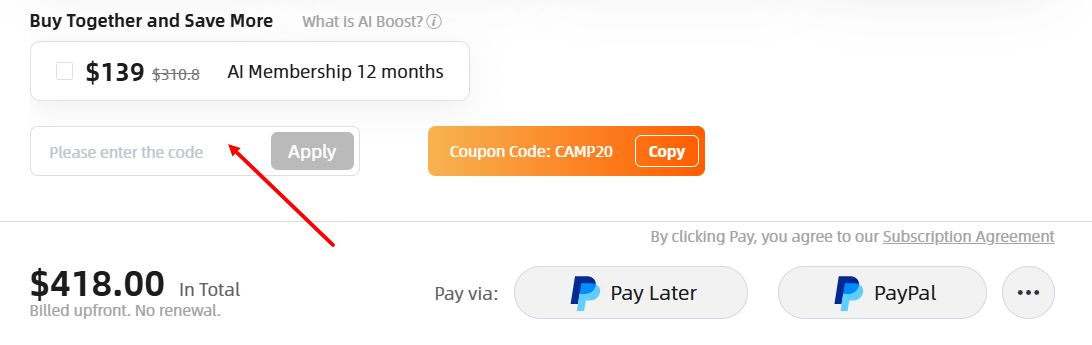
- Look for the "Please enter the code" box at checkout and paste in the discount code from KODOBI.
- Check that the discount code went through and the price on screen already reflects the discount before you pay.
- Log in (or sign up) and complete checkout to switch on your Homestyler plan at the lower price.
Current offers
Homestyler's current lineup spans every stage of a project, from a first login to full AI-driven interiors, and each deal is built around a specific need rather than a blanket upgrade.
- Summer Bootcamp access: Use discount code CAMP20 knock 20% off 3-, 6-, and 12-month memberships and throws in free AI Credits–a solid pick for anyone juggling multiple rooms or a longer-term project.
- A welcome gift for new users: Fresh Homestyler accounts unlock a free welcome gift, giving newcomers a head start as they build their first space.
- Free access for early projects: Homestyler's basic free plan lets users try the tools firsthand before committing to premium features or hunting down a promo code.
- AI Boost membership bundle: Buy Together and Save More bundles in full AI tool access, 1,500 AI Credits monthly, and quicker, sharper AI output–built for frequent AI users.
KODOBI rounds up Homestyler deals in one place–active discounts, coupon offers, and promo code drops–so there's no need to hunt across different sites. Just browse the list and grab whatever fits before you upgrade.
Benefits and features
Homestyler pairs the ease of a browser-based tool with the kind of visual polish you'd expect from dedicated software. It's built to help people turn rough ideas into realistic interior concepts, no professional design background required.
- Homestyler lets users build 3D interiors directly in the browser, keeping the design process accessible for beginners while providing enough flexibility for experienced users to create detailed concepts.
- Realistic rendering helps users weigh layouts, furniture choices, and overall style before committing to real changes–useful both for homeowners testing renovation ideas and for professionals presenting concepts to clients.
- AI-powered tools speed up the early stages by helping users generate ideas and try out different versions of a space without rebuilding each one from scratch.
- A large catalog of furniture, décor, and interior elements lets users produce convincing visualizations rather than plain sketches or empty room layouts.
Product and service range
Homestyler brings together the core tools you need to go from a rough interior idea to a finished visual concept:
- Room planning and 3D modeling: Build spaces from scratch, test layouts, and swap styles while seeing how each choice plays off the others in a virtual environment.
- AI-assisted concepting: Generate ideas and explore new directions faster, so the creative stage relies less on trial and error.
- Realistic rendering: Turn a layout into a detailed render that helps homeowners, designers, and clients picture how a space will actually look.
- Furniture and décor library: Draw from a wide range of virtual pieces to furnish rooms, recreate ideas, and add convincing detail to any project.
- A shared community: Browse other people's projects, gather inspiration, and post your own work for others to see.
Homestyler gives people a way to test design decisions before they commit to a real space. A homeowner can try out a renovation idea; a designer can put together clean visuals for a client–both within the same tool. Between its planning features, realistic previews, and AI assistance, Homestyler turns loose concepts into something concrete enough to refine, discuss, and actually build.