Best Time to Save at Foxit
We analyzed 12 months of promo code history to show when Foxit typically offers the most promo codes and the biggest discounts. Use these trends to find the best time to shop.
-
🏷️
Highest discount:
15% (August)
-
🎟️
Most promo codes:
7 (June)
-
📅
Last updated:
Today
Foxit code verifications
Live dashboard of recent Foxit code checks and shopper reports.
Foxit is a software company best known for PDF tools, electronic signatures, and document workflows. Founded in 2001 and headquartered in Fremont, California, the company started by developing lightweight PDF software and grew into a global provider for both individual users and organizations. Foxit Reader, introduced in 2004, helped establish the brand as an alternative to heavier applications in the space.
Its audience now ranges from people who need a dependable reader or editor to businesses managing contracts, forms, approvals, and large document workflows. What distinguishes Foxit is the breadth of that offering: its portfolio covers free reading, advanced editing, eSign, mobile access, and AI-assisted document work rather than focusing on a single function. Anyone weighing a Foxit promo code should factor in that range, since the right plan depends heavily on whether the need is occasional document work or a full workflow overhaul.
How to save on purchases from Foxit
Foxit gives you several ways to pay only for what you need, from the free Reader to trials, annual plans, AI allowances, and alternative licensing. Match the tier to the kind of work you actually do first, then decide whether a promo code, coupon, or discount makes that specific pick cheaper.
- Start with Reader, not a paid tier: Foxit PDF Reader is free and covers everyday viewing, annotating, form-filling, and signing. If Reader already does the job, no promo code changes that; only look at editors once you hit something Reader can't do.
- Run PDF Editor+ against real work: the 14-day trial needs no card and unlocks AI tools, Smart Redact, and mobile features. Test it on your own files, not samples–if it earns its place, that's when a coupon is worth chasing.
- Price-check before committing to a plan: once you've settled on a tier, weigh any promo code against the sticker price. This matters most when a small gap between tiers is the only thing keeping you off the editor you actually need.
- Pick monthly or annual based on how long you'll use it: monthly suits a one-off project; annual makes more sense if editing PDFs is a year-round part of your work. A discount pays off when it's attached to a plan you'd buy anyway–not when it's the reason you commit longer than planned.
- Use your AI credits before spending more: paid Reader, Editor, and Editor+ plans all include 20 AI Assistant credits monthly, and even a free account gets 20 via the web platform. That's often enough for the odd summary, quick question, or translation–a coupon shouldn't tempt a light user into paying for room they won't use.
- Upgrade AI capacity when the workload justifies it: early-access pricing starts at $49.99/year for 2,000 monthly credits across Foxit's apps. If you're regularly digging through long reports or big batches of files, that upgrade earns its keep–and a promo code can soften the cost once you're there.
- Weigh perpetual licenses against subscriptions: Foxit also sells one-time perpetual licenses for supported software, aimed at people who won't change their desktop setup. AI Assistant isn't part of that–it's subscription-only–so any price break on a perpetual license needs to be judged against how much you actually rely on AI features. If it's close, a coupon on the subscription side may settle it..
- Let a coupon soften the annual sting: paying yearly upfront can be a real barrier even when it's the smarter long-term option. For freelancers or small teams with steady PDF needs, a coupon or discount can ease that lump sum without pushing you toward a weaker tier.
- Time your search for real triggers, not calendar sales: a new contract, a pile of scanned records, a new school term, or a switch to e-signatures are actual reasons to reassess your setup. That's the moment to hunt for a Foxit promo code or coupon–not jumping early just because a discount happens to be running.
Kodobi tracks current Foxit promo codes, coupon terms, and discount offers in one place for a final price check. Use it to see whether a promo code or coupon actually lowers what you'll pay, rather than assuming any advertised discount is worth acting on.
How to apply a Foxit promo code
Kodobi surfaces active Foxit promo codes before you commit to a purchase on the official site. Once you've picked the plan that matches your needs, redeem the code at checkout:
- Select the Foxit plan you want and click "Buy Now."
- On the cart or checkout page, locate the "I have a promotional code" field.
- Enter the Foxit discount code and click "Apply."
- Check that the discount has been applied to the price, then click "Continue."
- Fill in your billing and account details to finish the order.
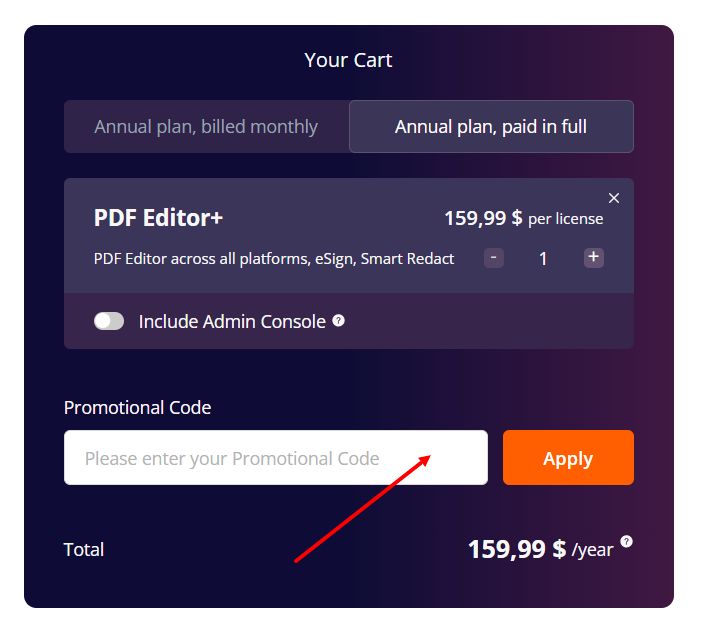
Current offers
The most valuable Foxit offers aren't tied to a headline percentage–they're tied to whether you meet the criteria behind it.
- Annual billing: Paying for a Foxit plan yearly runs about 25% cheaper than the same tier billed monthly, a structural saving that outlasts any coupon or promo code.
- Education access: Students, teachers, and school staff verified with a school-issued email pay $49.99 a year for PDF Editor+ for Education, down from $159.99–no discount code required, since it's applied automatically.
- Business licensing: Teams deploying Foxit across a larger group can negotiate up to 30% off through volume licensing, which also bundles in enterprise-grade security, centralized administration, and custom deployment options.
- Nonprofit support: Eligible nonprofits can request dedicated Foxit pricing directly through sales–a discount arranged outside the checkout process entirely, bypassing the usual coupon or discount code step.
Kodobi lists these alongside active Foxit promo code and coupon offers, so it's easy to tell an eligibility-based discount apart from a standard promotional deal.
What makes Foxit stand out
Foxit covers the document workflow from reading to signing, with enough depth for business use without making every feature dependent on an enterprise setup.
- Everything in one place. Editing, conversion, OCR, redaction, form-filling, and eSignatures all live inside a single tool, so files don't need to hop between separate apps.
- AI that reads the fine print. The built-in AI Assistant can condense long agreements, reports, or manuals and answer specific questions about their contents.
- A free tier that actually holds up. Foxit Reader stays fully functional at no cost, so upgrading to a paid plan is optional rather than assumed.
- No desk required. Desktop, web, and mobile versions keep files accessible when work shifts away from a main computer.
- Ownership, not just access. Beyond subscriptions, Foxit still sells perpetual licenses for select software–a route for buyers who'd rather pay once than keep renewing.
Product range
Foxit spans the full lifecycle of document work, from everyday viewing to editing, signing, AI-assisted analysis, and enterprise-grade deployment.
- View, mark up, and sign: Foxit PDF Reader covers everyday viewing, annotation, form filling, and signing, while PDF Editor layers on direct editing, conversion, OCR, forms, and redaction.
- Take it beyond the desktop: PDF Editor+ pairs advanced editing with web and mobile access, so the same workflow travels with you rather than staying tied to one machine.
- Automate what used to be manual: Foxit eSign handles electronic signature workflows, while AI Assistant summarizes documents, answers questions about their contents, translates text, and pulls out specific details on demand.
- Built for scale: Enterprise-focused tools bring centralized deployment, administration, security, and document governance to organizations running larger or more tightly controlled workflows.
Foxit earns its place when document work stops being occasional and starts eating into real time. A free reader covers the basics, but editing, OCR, eSign, AI tools, and fuller workflow features pay off once the workload gets heavier–letting users scale into only the functionality their work actually demands.